Give participants more sessions
Raise an engagement's session allowance, and tell participants they can book again.
Last updated 22 October 2026
How the session allowance works
An engagement can give each participant a number of sessions to book when they need them. For example, "up to 2 sessions of 90 minutes". This allowance belongs to the engagement, so it is the same for every group that uses the engagement.
When you raise the allowance, the change applies immediately to every participant in every group on that engagement. Participants who had used all their sessions can book again straight away.
Raise the allowance
Step 1: Get coaches ready
Participants can book as soon as you save. Before that, make sure the coaches have added availability for the period when the extra sessions should happen.
Step 2: Change the number of sessions
- Open the project, select Engagements, and open the engagement.
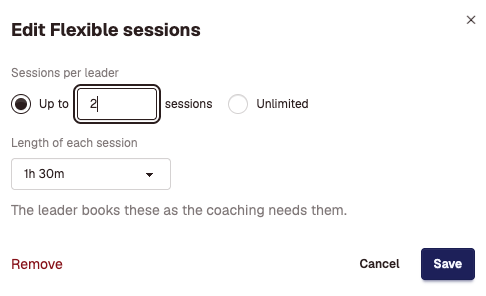
- In the Plan card, find the Flexible sessions row and select Edit.
- Under Sessions per leader, change the number after Up to, for example from 1 to 2.
- Check Length of each session, and select Save.
Step 3: Tell participants they can book
Raising the allowance doesn't send any email. Participants see the extra session on their dashboard the next time they sign in, but many won't sign in unless you tell them. Choose one of these:
- For participants already in the programme: send a manual email. Open Email, then Manual Emails, select New email, choose the engagement, and invite them to book their next session.
- For future groups: on the engagement's page, add an email to the Get the next session booked goal. It sends after a session is confirmed as completed, when the participant still has a session to book. It does not send when you change the allowance.
Step 4: Check which sessions each automated email is for
An automated email tied to a session can send for every session or only for some. With a second session, check each email on the engagement's page:
- An email that should go only before the first session, such as one releasing a report, should have Only these sessions with only Session 1 ticked.
- An email that should go after every session, such as a feedback survey, should send for every session.
Good to know
- The allowance applies to every group on the engagement, including groups you add later. A new group's participants can book all their sessions from the start. Matchwell can't yet open the extra session on a later date for one group only.
- To give one participant an extra session without changing the engagement, open their participant page. In the Engagement scope card, under Release, choose Extra sessions. Enter How many, and select Release.
- You can lower the allowance again, but not below the number of sessions a participant has already used. Matchwell lists anyone who would be affected and doesn't save the change.
Didn't answer your question?
Send us a message and we'll reply by email.